




Ninjabot delivers ready-to-deploy sales AI and automation tools that allows business operators to stop doing busywork and start managing leverage.
Somewhere around client automation number 40, I built a lead-routing flow for a marketing agency. Route by service type, assign to the right account manager, trigger a personalised follow-up. Solid build. The client was happy.
Six weeks later it broke. A lead came in from a source the filter hadn’t been designed for. It routed nowhere. No alert, no fallback. Just a lost contact and a client asking why nobody had followed up.
When I went in to fix it, I hadn’t missed a technical step. I’d missed a design question I didn’t know to ask: what happens to inputs this flow doesn’t recognise?
That wasn’t an n8n problem. It was a pattern problem. I didn’t know what to look for when I sat down to build, because I didn’t yet have a name for what I was building.
The real problem isn't starting from scratch – it's not knowing what to look for
Most builders approach a new brief the same way: read the requirements, map the happy path, build the flow, test it, ship it. That process works for the obvious cases.
What it doesn’t give you is the non-obvious questions. The ones that determine whether the automation is reliable in week six, not just week one. What happens when the input is malformed? What’s the exit condition if the loop never resolves? What does the system do with data it wasn’t designed to handle?
Without a pattern framework, these questions don’t surface until something breaks. You don’t know to ask them because you don’t yet have a name for the type of thing you’re building. Different types have completely different failure modes.
What building without a pattern actually costs
The hours aren’t the main cost. The quality of what gets built is.
An automation designed without knowing its pattern type handles the happy path well and everything else poorly. It works in testing. It works for the first few weeks. Then an edge case arrives: an unexpected input, a loop that never exits, a source that returns zero records. The automation either fails silently or produces wrong outputs that nobody catches until the damage is downstream.
The automations that required the most rework across 2000 builds weren’t the complex ones. They were the straightforward ones where the builder hadn’t asked the right structural questions at the start, not because those questions are hard to answer, but because without a pattern framework, they’re hard to think of.
The 6 automation patterns: what to look for in each one
By automation number 100, I had catalogued enough failures to see the pattern underneath each one. By 2000, across agencies, SaaS companies, logistics operators and consultancies, every build mapped to one of six architectural types. Each type has its own design questions, its own failure modes, its own pre-build checklist.
Name the pattern first. Then you know what to look for.
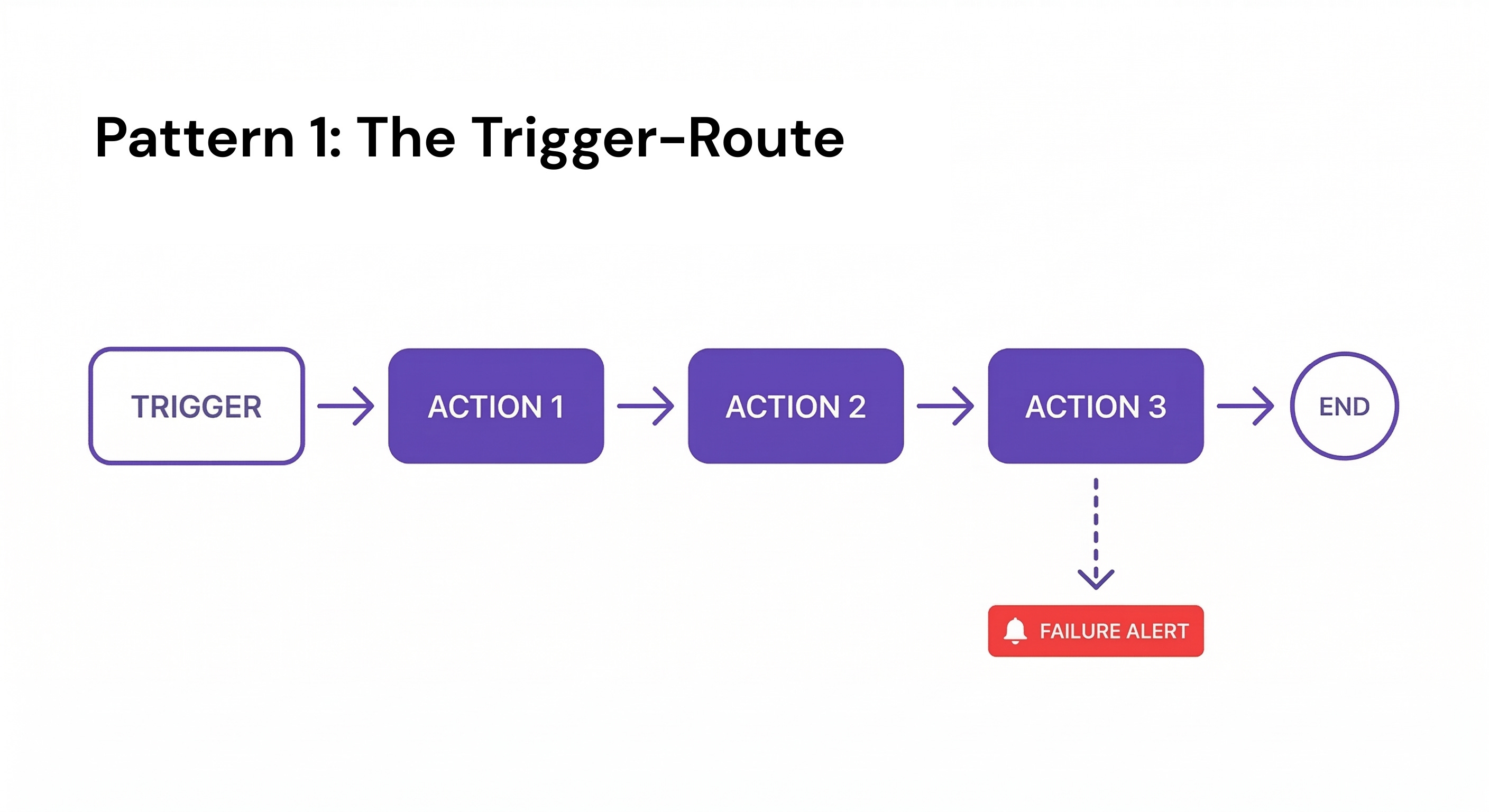
Pattern 1: The Trigger-Route
One event, one linear path, one outcome. Notifications, confirmations, data syncs. Example: client books a meeting → create CRM record → send confirmation → notify account manager in Slack.
Best practice: Add a failure alert at the last step. If the final action doesn't fire, you want a Slack ping to a named owner, not a silent gap in your CRM. Trigger-Routes fail silently more than any other pattern.
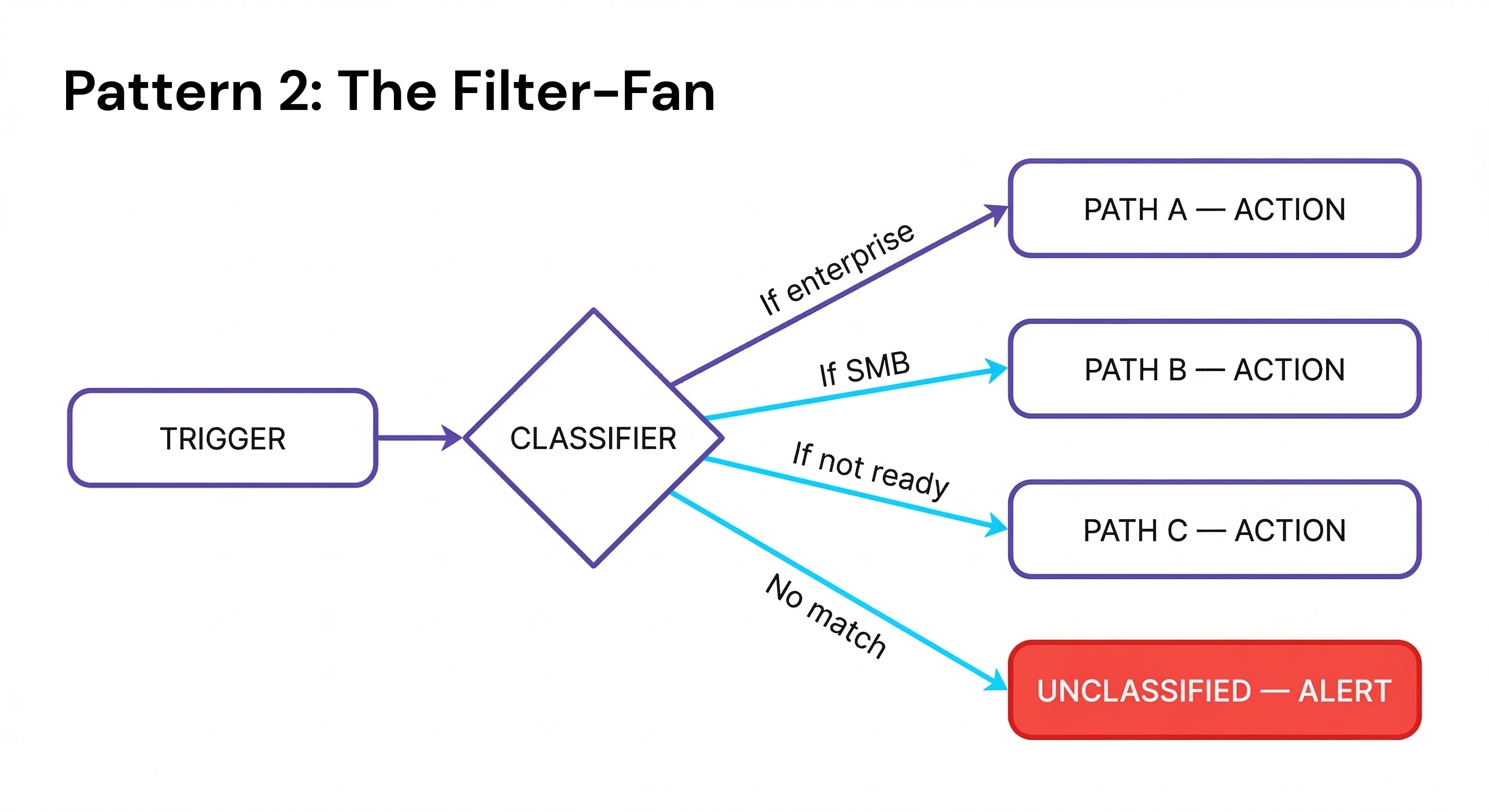
Pattern 2: The Filter-Fan
One input fans out into multiple conditional exits depending on its properties. The most common pattern in service business automation, roughly 60% of everything you'll build. Example: inbound lead → classified by service interest → routed to the right rep, or dropped into a nurture sequence if not ready.
Best practice: Always build an "unclassified" exit: the branch that catches anything the filter didn't expect. Every Filter-Fan without a catch-all eventually drops records silently. The unclassified branch should alert a human, not auto-discard.
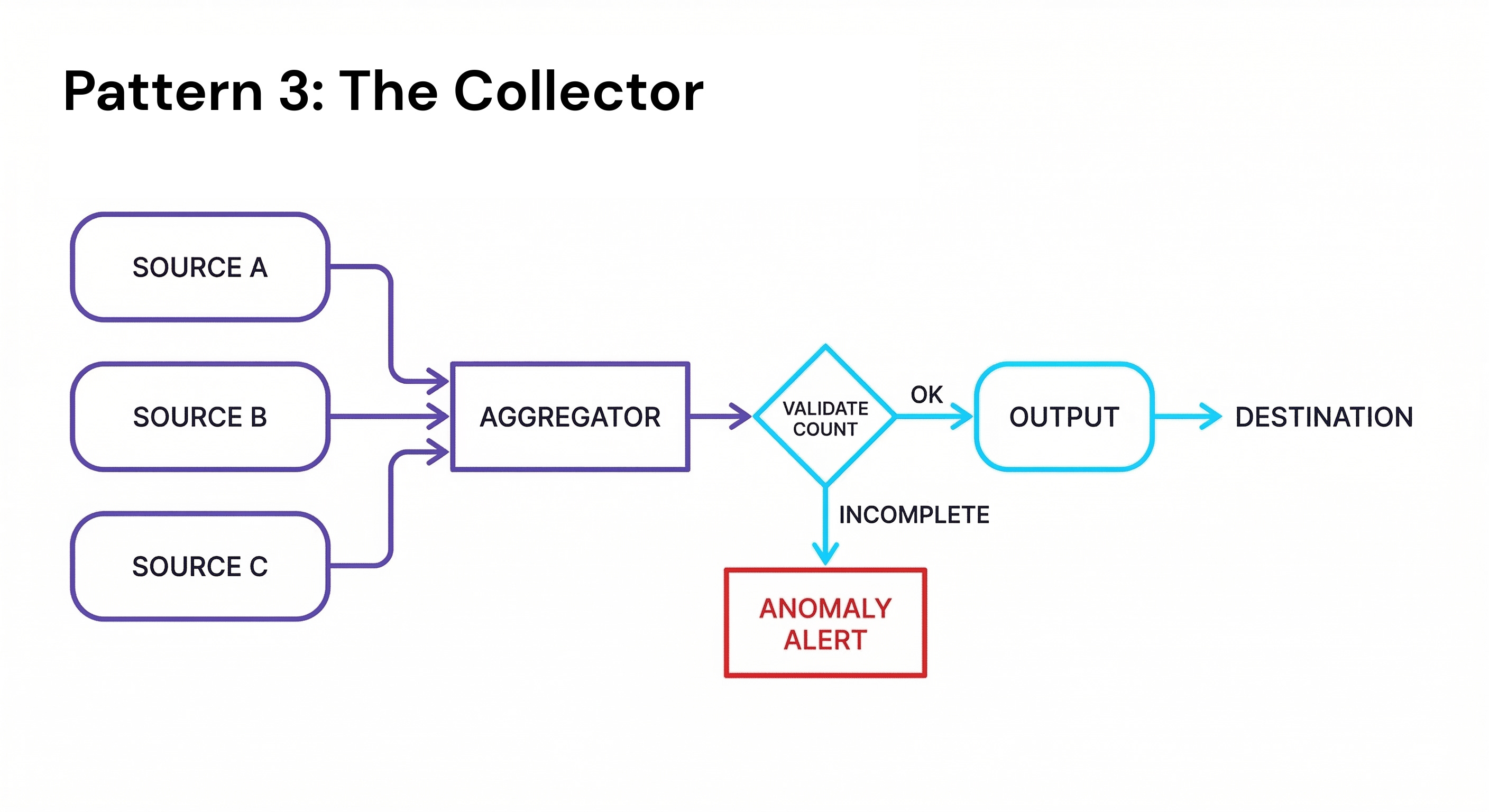
Pattern 3: The Collector
Multiple data streams aggregated into one output before any action is taken. Example: sales data from three regional CRMs → merged into one master sheet → single weekly summary email to the CEO every Monday at 7am.
Best practice: Validate record count before the output fires. If you're aggregating from three sources and one returns zero records unexpectedly, flag the anomaly. Don't silently send a summary built on incomplete data.
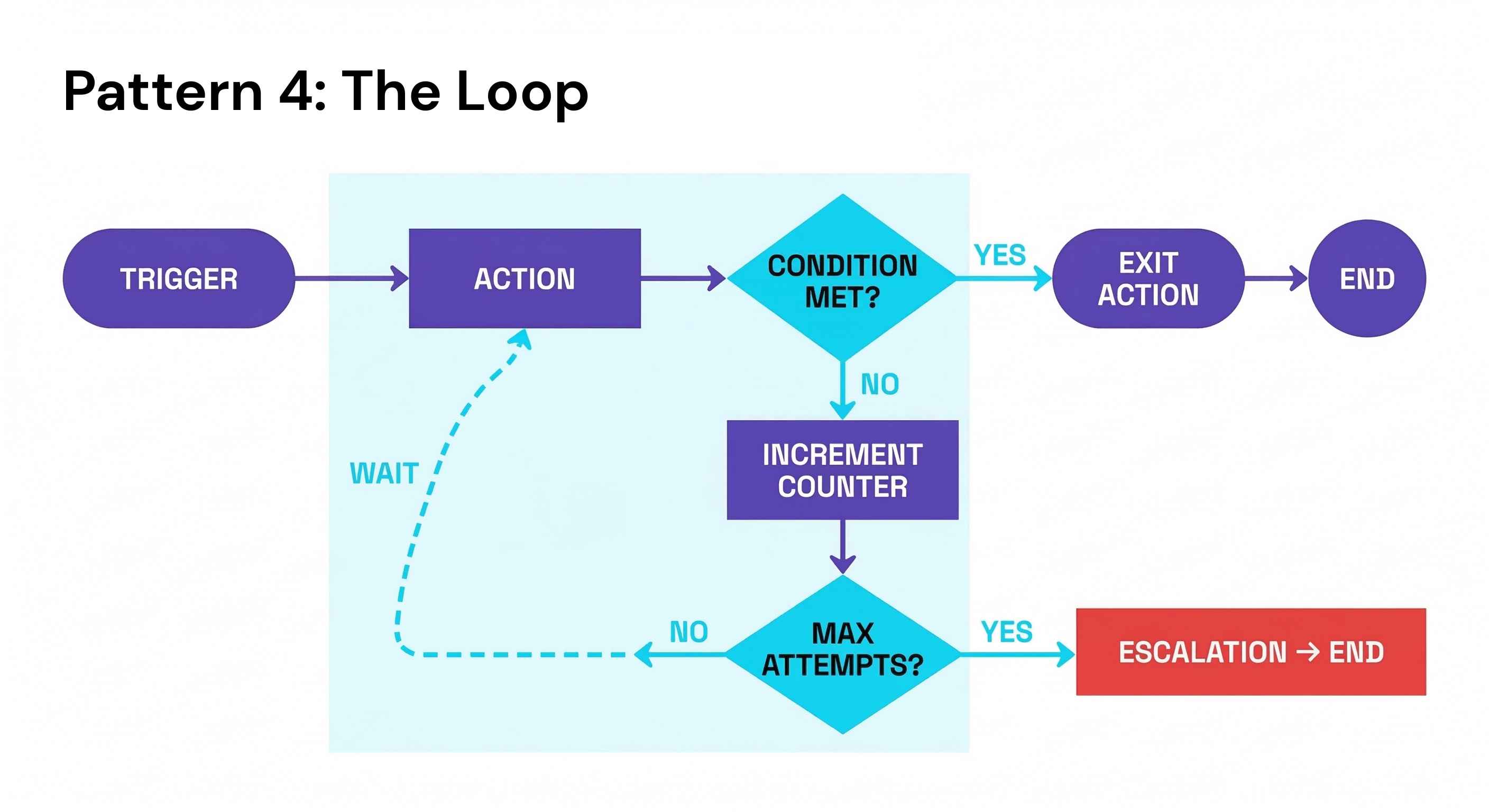
Pattern 4: The Loop
Repeat until a condition is met and the loop is explicitly broken. The backbone of follow-up sequences, retry logic, and escalation flows. Example: invoice sent → unpaid at day 7 → reminder → unpaid at day 14 → second reminder → unpaid at day 21 → flagged to accounts and loop exits.
Best practice: Always define a hard exit condition beyond the primary one. "Loop until paid" is incomplete. You also need "exit after N attempts regardless." Infinite loops don't throw errors; they just run your operation count to zero.
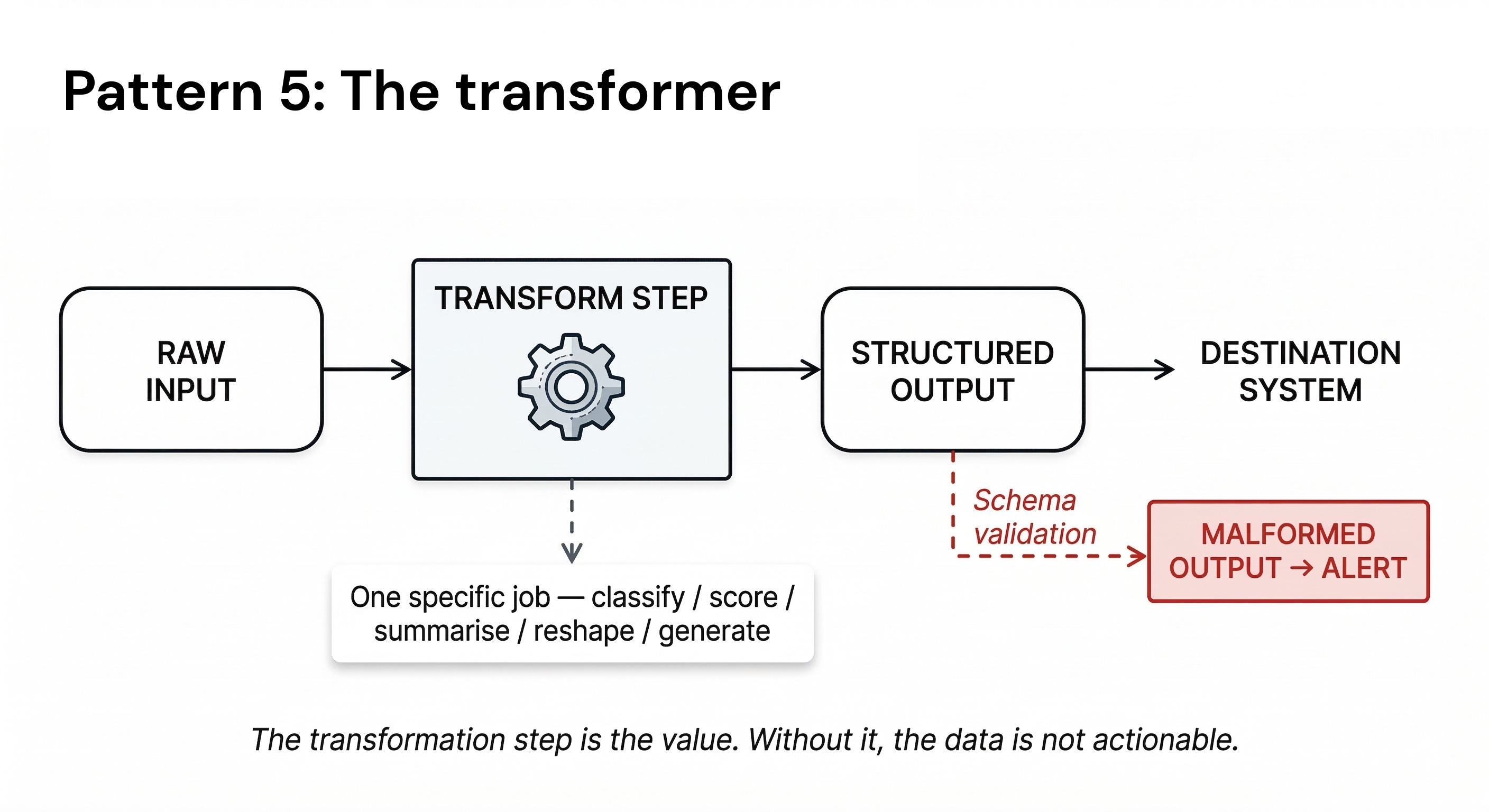
Pattern 5: The Transformer
Raw input enters, gets processed or reshaped (most often by an AI step) and exits as something structured and usable by the next system. The reliable architecture for this pattern is the AI Sandwich: automation delivers clean, consistent data to the AI (Top Bun), the AI performs one specific job (Meat), automation catches and routes the output (Bottom Bun). Humans review results. They don't move data. Example: client fills in a brief form → AI extracts key requirements and formats them into a structured project spec → spec posted to ClickUp with the right template applied.
Best practice: Treat the AI prompt as a typed function, not a conversation. Define the exact output schema before writing the prompt: JSON field names, data types, character limits. An AI that returns freeform text into an n8n router is a reliability problem waiting for its first edge case.
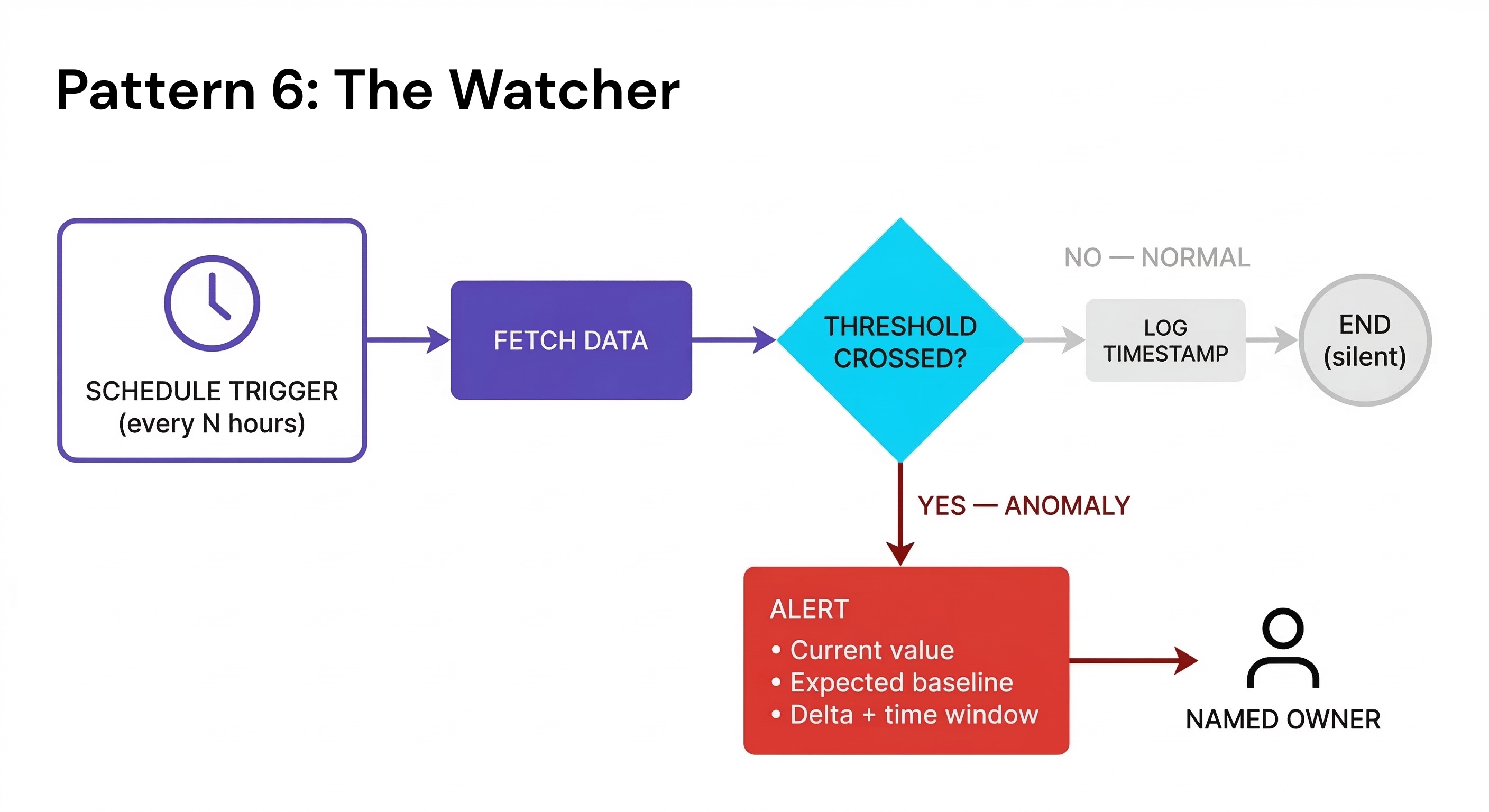
Pattern 6: The Watcher
A passive monitor running continuously, firing only when a threshold, anomaly, or condition is crossed. Invisible when everything works; invaluable when it doesn't. Example: revenue dashboard checked every 4 hours → daily bookings drop 20% below baseline → alert sent to founder with last 48 hours of data attached.
Best practice: Set check frequency based on how fast you can act, not how fast the problem develops. Checking every 15 minutes is useless if your response time is same-day. Check hourly. Act daily. And always include the data that triggered the alert in the message. A notification that just says "anomaly detected" is noise.
The remaining 10% of builds? Almost always a Transformer feeding into a Filter-Fan. The AI reshapes the input, then the reshaped output gets routed by type.
What changes when you build with a pattern in mind
The first thing that changes is the questions you ask before you open the builder. Classifying the flow first (five minutes, not three hours) surfaces the design questions that matter for this pattern type. Before the build, not after the first failure.
The second is your relationship with reliability. Most automation fragility isn’t caused by technical mistakes. It’s caused by design questions that were never asked. The pattern gives you the question list. The build answers it.
The third is how you read other people’s automations. You’ll start seeing what’s missing, not because you’re hunting for bugs, but because you know what a complete version of that pattern looks like.
I had been building flows without knowing what type of thing I was building. Once you have the names, you cannot un-see the gaps they reveal.
– Yuri
P.S. Are there any other patterns that I missed? Reply to this email or make a comment, I read every response.
🔧 Tools & Resources
Excalidraw: Draw all six patterns as reusable visual templates in under 10 minutes. Free, browser-based, no account required. Breaks as a collaboration tool above 3–4 simultaneous editors.
Webhook.site: Captures every incoming webhook payload in real time so you can see the exact data structure before designing routing logic. Essential for Filter-Fan and Trigger-Route builds
Activepieces: Self-hostable Make.com alternative with native Loop pattern support, handles iteration and retry logic without operation-count pressure at volume. Self-hosting requires Docker comfort.
📥 Download my Automation Architecture Guide
The Automation Architecture Guide is in the Builder’s Vault: every pattern named and diagrammed with its decision criteria and automation module suggestions. If you build even one automation per month, it replaces the blank-canvas design step permanently.
You can access it here.
that was a great explanation to these patterns + great visual.